免费加入 | |
≥3年粉丝 | |
星球成员 |
工具简介
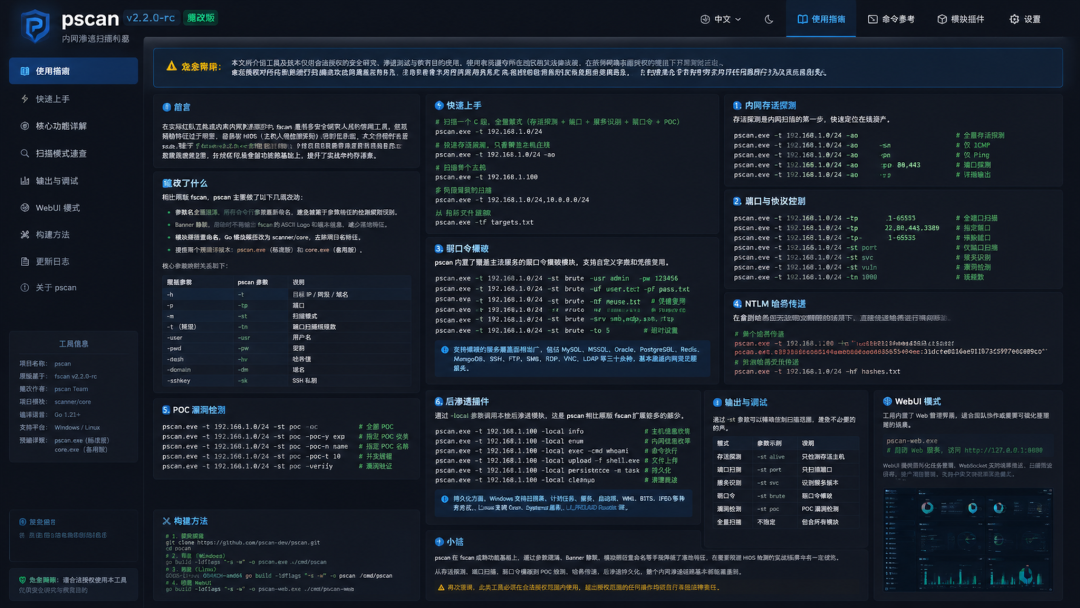
参数名全面混淆:所有命令行参数重新命名,避免被基于参数特征的检测规则识别。Banner静默:启动时不再输出 fscan 的 ASCII Logo 和版本信息,减少落地特征。模块路径重命名:Go 模块路径改为 scanner/core,去除项目名特征。两个预编译版本:pscan.exe(标准版)和 core.exe(备用版)。
工具使用
常用命令:
# 扫描一个 C 段(存活探测 + 端口扫描 + 服务识别 + 弱口令爆破 + POC)pscan.exe -t 192.168.1.0/24# 仅存活探测pscan.exe -t 192.168.1.0/24 -ao# 扫描单个主机pscan.exe -t 192.168.1.100# 扫描多个 IP 段pscan.exe -t 192.168.1.0/24,10.0.0.0/24# 从文件读取目标pscan.exe -tf targets.txt
内网扫描:
# 全量扫描整个 C 段(最常用)pscan.exe -t 192.168.1.0/24# 仅存活探测(快速定位在线主机)pscan.exe -t 192.168.1.0/24 -ao# ICMP 模式存活探测pscan.exe -t 192.168.1.0/24 -st icmp# 存活探测 + 仅在线主机做端口扫描(跳过离线主机)pscan.exe -t 192.168.1.0/24 -ao -st all# 扫描多个网段pscan.exe -t 192.168.1.0/24,10.10.0.0/16# 扫描 IP 范围pscan.exe -t 192.168.1.1-100# 排除特定主机pscan.exe -t 192.168.1.0/24 -et 192.168.1.1,192.168.1.254# 从文件读取目标列表pscan.exe -tf targets.txt
POC漏洞检测
# 全量扫描 + POC 检测(默认开启)pscan.exe -t 192.168.1.0/24# 禁用 POC 扫描(加快速度)pscan.exe -t 192.168.1.0/24 -nopoc# 全量 POC 扫描(更全面但更慢)pscan.exe -t 192.168.1.0/24 -full# 指定 POC 名称pscan.exe -t 192.168.1.100 -pocname thinkphp# 自定义 POC 脚本目录pscan.exe -t 192.168.1.100 -pocpath ./custom-pocs/# 调整 POC 并发数pscan.exe -t 192.168.1.0/24 -num 10# 启用 DNSLogpscan.exe -t 192.168.1.0/24 -dns
后渗透插件
通过 -local 参数调用:
# 列出所有本地插件pscan.exe -local list# 使用特定插件pscan.exe -local systeminfo
systeminfo | ||
reverseshell | ||
forwardshell | ||
socks5proxy | ||
keylogger | ||
minidump | ||
sshkey | ||
cleaner | ||
crontask | ||
systemdservice | ||
ldpreload | ||
winregistry | ||
winschtask | ||
winservice | ||
winstartup | ||
winlogon | ||
winwmi | ||
winbits | ||
winifeo |
下载地址
https://github.com/webzzaa/pscan
知 识 星 球

限时免费 | |
≥3年粉丝 | |
星球成员 |
往期推荐工具